
How Easy are Ledger Signers for First-Time Cold Wallet Users

This content includes affiliate links for Ledger products. If you purchase through these links, we earn a commission at no extra cost to you. This is not financial advice. Cryptocurrency assets carry high risks, including the risk of losing your entire investment. Please do your own research and make decisions based on your personal risk tolerance.
If you are new to crypto security, the idea of using a cold wallet can feel a little intimidating. Words like “private keys,” “seed phrases,” and “offline storage” sound technical, and many beginners worry they might press the wrong button and lose everything. The good news is that modern Ledger devices, including the newer Signer style wallets, are designed with beginners in mind. They are not just secure, they are surprisingly affable once you get past the first setup.
Let’s walk through what the experience is really like for a first-time user, and how the wider Ledger range fits into the picture.
How Easy are Ledger Signers for First-Time Cold Wallet Users
First Impressions, Not as Scary as It Sounds
When someone hears “cold wallet,” they often imagine complicated software or coding screens. A Ledger Signer or any Ledger device is nothing like that. You are not installing servers or writing commands. You are basically unboxing a small gadget, similar in size to a USB stick or a slim credit card device, then following guided steps on your computer or phone.
Most beginners are surprised by how normal it feels. The device has a screen, physical buttons or a touch surface depending on the model, and clear instructions. Instead of diving into crypto jargon immediately, the process feels more like setting up a new smartphone accessory.
The biggest mental hurdle is understanding that you are in control of your keys. Once you accept that responsibility, the rest is mostly clicking “next” and confirming actions.
Setup Experience, Step by Step Simplicity
For a first-time user, setup is where confidence is built or lost. Fortunately, Ledger’s process is fairly friendly.
Install Ledger Wallet
You download the official app on your computer or phone. The interface is clean and modern, not cluttered with technical terms. It guides you visually.
Connect the Device
Plug in the wallet or pair it via Bluetooth if the model supports it. The app detects it automatically.
Create a New Wallet
This is where the recovery phrase is generated. The device itself shows the words on its own screen, which is important for security.
Write Down the Recovery Phrase
This is the one step that requires real attention. You write the words on somewhere safe and store them offline. It is simple, but it must be done carefully.
Set a PIN
Just like unlocking a phone. Easy and familiar.
After this, you are ready to receive crypto. The whole process usually takes 15 to 25 minutes for someone completely new. There is no advanced tech knowledge required, just patience and careful reading.
Everyday Use, Surprisingly Smooth
Once set up, using a Ledger Signer is straightforward. Sending or receiving crypto involves confirming the transaction on the physical device. This extra confirmation step is what keeps funds safe, but it also reassures beginners because nothing happens silently in the background.
For example, if you want to send Bitcoin, you enter the address in Ledger Wallet, then the device screen shows the same address and amount. You press confirm. That is it. The physical confirmation becomes a habit very quickly.
Many first-time users say the biggest shift is emotional, not technical. At first, they double-check everything. After a few transactions, it becomes routine.
The Full Ledger Range, Options for Different Comfort Levels
Ledger Nano S Plus
This is often considered the beginner sweet spot. It is affordable, supports a large number of coins, and connects via USB. No Bluetooth, no touch screen, just simple buttons and a clear screen. For someone who wants solid security without extra features, this is usually the easiest starting point.

Ledger Nano X
A step up in convenience. It adds Bluetooth support, which means you can manage crypto from your phone without cables. First-time users who value mobility often prefer this. The interface is still simple, but it feels more modern.
Ledger Stax
This is the premium model. It has a curved E Ink touch screen and a sleek design that looks more like a mini tablet than a USB stick. For beginners who want the most user-friendly visual experience and do not mind paying more, this device feels very intuitive. The touch screen reduces the “button clicking” learning curve.

Ledger Flex
Positioned between the Nano series and Stax, this model focuses on comfort and readability. The screen is larger than the Nano devices, which helps first-time users who are nervous about verifying addresses on tiny displays. It feels less cramped and more relaxed to use.

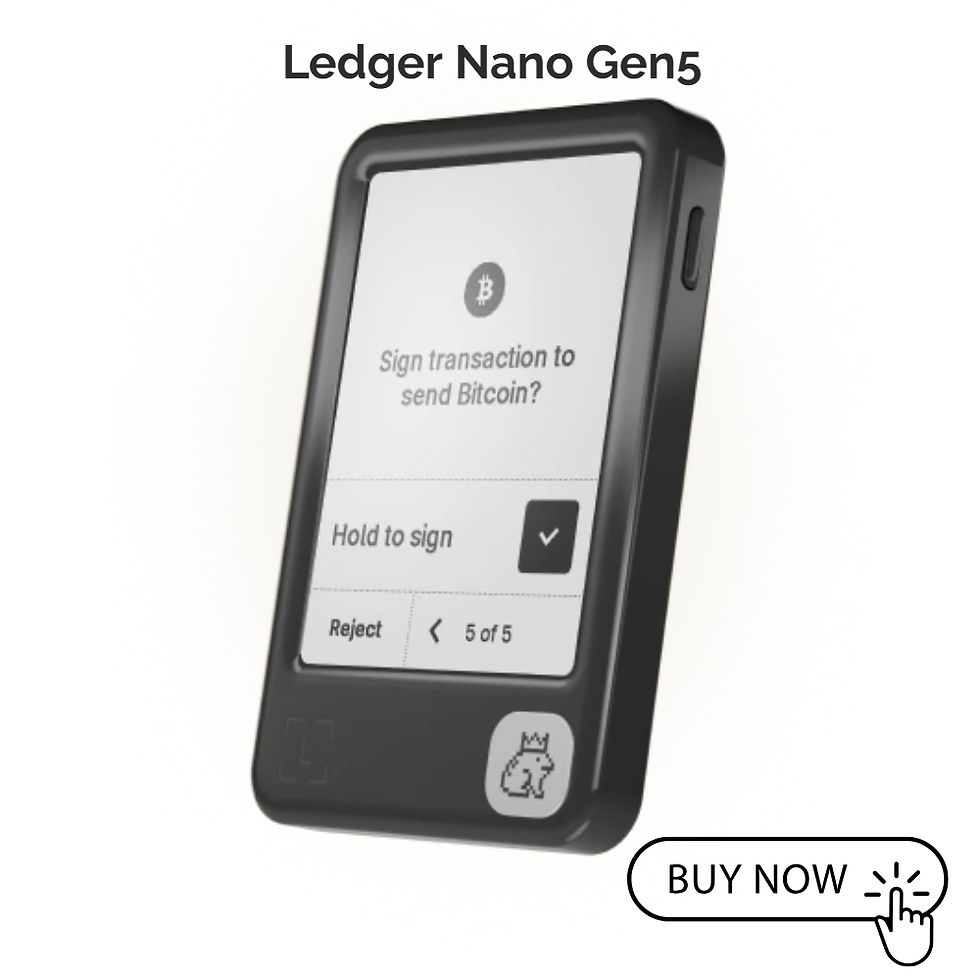
Ledger Nano Gen5
One of the latest models, this device combines modern speed with easy onboarding. It offers a larger screen and faster performance than older models, which means beginners spend less time scrolling. The Gen5 feels like a next-gen upgrade that still stays true to Ledger’s simple, beginner-friendly foundation.
Common Beginner Worries, and the Reality
“What if I lose the device?”
You can restore your wallet with the recovery phrase on a new Ledger. The device is replaceable. The phrase is what truly matters.
“What if I press the wrong button?”
Transactions must be confirmed on the device. Accidental taps rarely lead to permanent loss. The system is designed to slow you down slightly so mistakes are less likely.
“Is it too technical for me?”
If you can install an app and follow on-screen instructions, you can use a Ledger. The learning curve is gentle, not steep.
“What about firmware updates?”
Updates happen through Ledger Wallet with clear prompts. You click update, confirm on the device, and wait a few minutes. It is closer to updating a phone app than installing complex software.
Where Beginners Usually Struggle
The hardest part is not the hardware. It is the recovery phrase discipline. Writing it down carefully, storing it somewhere safe, and never taking screenshots or photos is crucial. This is more about habits than skill.
Another small hurdle is understanding blockchain fees and network selection, but that applies to all wallets, not just Ledger. The wallet itself does not complicate this, it simply reflects what the network requires.
Why Many First-Timers End Up Recommending It
After the first week, many new users realize they were more afraid of the concept than the process. The physical confirmation creates a sense of control. The screens are readable. The steps are guided. There is very little guesswork.
People often say it feels like locking valuables in a safe instead of leaving them in a drawer. The extra step of confirming on a device becomes reassuring rather than annoying.
Easy Enough for Most People
So how easy are Ledger Signers for first-time cold wallet users? Easier than most expect. The setup is guided, daily use is repetitive in a good way, and the devices are built to prevent rushed mistakes. The main responsibility lies in protecting the recovery phrase, not mastering technology.
If someone is completely new and wants the simplest path, the Nano S Plus is a strong entry point. If they value mobility, the Nano X makes life easier. If they want the most visual and premium experience, Gen5, Stax or Flex feel more intuitive.
You do not need to be a tech expert. You just need a careful mindset and a few quiet minutes to set things up properly. After that, it becomes part of your normal crypto routine.


Comments